AI Maintenance Call Example 2026: What It Sounds Like
Explore a real AI Maintenance Call Example, from greeting and intake to triage, dispatch, and SMS updates. Learn scripts, KPIs, and PMS integration—book a demo.

Ever wondered what happens when a tenant calls with a maintenance issue at 2 AM? In the past, it meant a frantic call to an on call property manager. Today, it can be a smooth, efficient conversation with an AI. But what does a modern AI maintenance call example actually look and sound like? It’s more than just a robotic voice; it’s a sophisticated process designed to resolve issues faster, keep tenants happy, and protect your properties.
Let’s break down the entire lifecycle of an AI powered maintenance call, from the first “hello” to the final “job complete” notification. We’ll explore how each step works and why it’s a game changer for property management.
At a Glance: How AI Maintenance Calls Work
A modern AI maintenance call uses Natural Language Processing (NLP) to handle resident requests instantly. The process follows four key steps:
Instant Recognition: AI identifies the caller and property via PMS integration.
Intelligent Triage: The system categorizes the issue (Emergency vs. Routine) using a severity matrix.
Automated Troubleshooting: AI provides immediate safety steps (e.g., "turn off the water valve").
Seamless Dispatch: Emergency work orders are pushed to on-call staff via SMS/Phone, while routine tasks are synced directly to the PMS (e.g., AppFolio, Yardi).
The First Few Seconds: Making a Great First Impression
The moment a tenant calls, the clock starts. The initial interaction sets the tone for the entire experience. A great AI maintenance call example begins with a professional and reassuring start.
Greeting and Introduction
Instead of a generic ringtone or a clunky phone menu, the AI answers immediately with a clear and friendly greeting. For example: “Thank you for calling Maplewood Apartments. You’ve reached our 24/7 maintenance line. How can I assist you today?” This instantly confirms the tenant has reached the right place and that help is available.
Call Type Filtering and Intent Recognition
The AI’s next job is to understand why the tenant is calling. This is where call type filtering and intent recognition come in. The AI uses natural language processing to listen to the caller’s words and grasp their goal.
If the tenant says, “My ceiling is leaking water everywhere!” the AI recognizes the intent as reporting a new, urgent maintenance issue. If they say, “I’m just checking on the status of my work order for the broken dishwasher,” the AI identifies the intent as a follow up. This intelligent filtering, which often happens in under 3 seconds, ensures the call is handled correctly from the start without frustrating the tenant with a list of menu options.
Gathering the Details: The Foundation of a Successful Fix
Once the AI knows what the tenant needs, it moves on to gathering information. A common reason maintenance visits fail is incomplete information, with some studies showing Over 30% of maintenance requests require multiple visits due to incomplete intake information. A proper intake process prevents this.
Maintenance Call Intake and Verification
The AI begins by verifying the caller’s identity and location. It might use the incoming phone number to pull up the tenant’s record in your Property Management System (PMS).
“Hi Sarah, I see you’re calling from unit 4B. Is that correct?”
This simple verification step confirms the AI is creating a work order for the right person and place.
Data Collection for the Maintenance Ticket
Next, the AI collects all the crucial details for the work order. It asks probing questions to create a complete picture for the technician.
Tenant: “My heat isn’t working.”
AI: “I’m sorry to hear that. I know how uncomfortable that can be. To help our technician, could you tell me if the system is making any unusual noises or if you’ve noticed any other issues?”
This is a great AI maintenance call example of using empathy and natural language. The AI acknowledges the tenant’s frustration while methodically collecting data like the specific problem, when it started, and any troubleshooting steps already taken.
Triage and Prioritization: The AI’s Most Critical Job
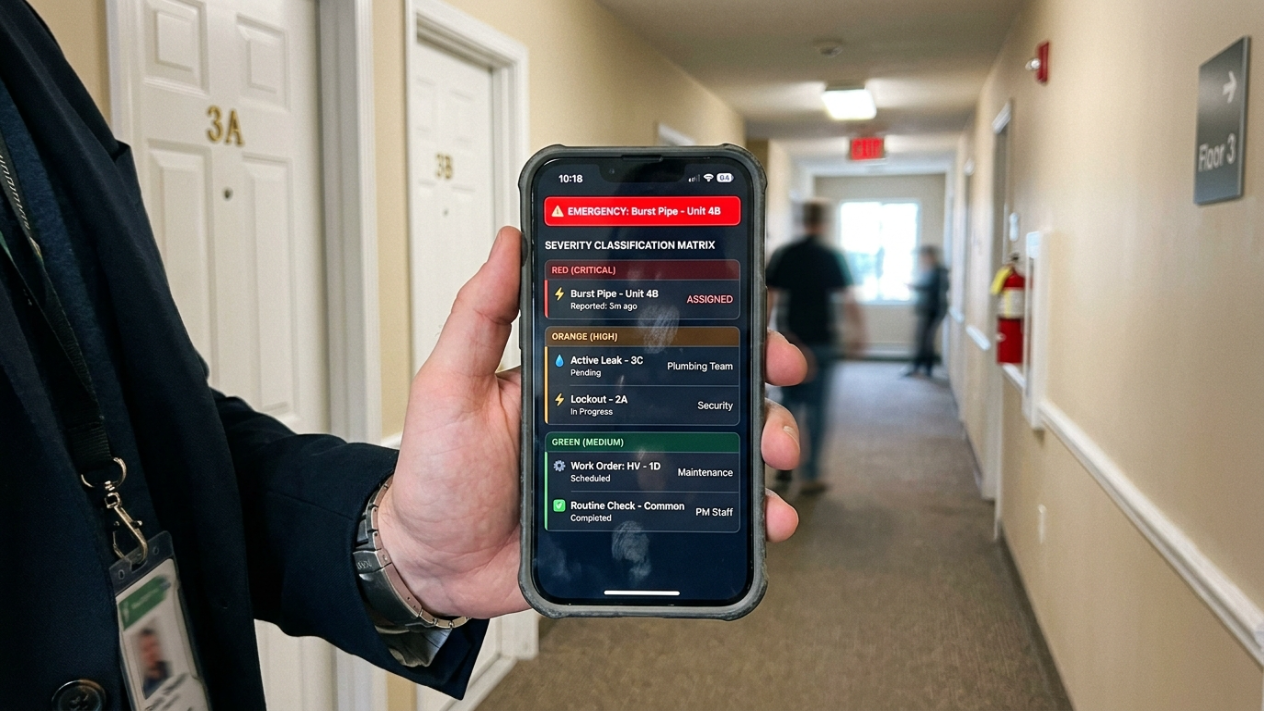
Not all maintenance requests are created equal. A dripping faucet is an annoyance; a gas leak is a life threatening emergency. This is where AI maintenance triage becomes essential.
The Severity Classification Matrix
The AI uses a predefined severity classification matrix to categorize the issue. For a deeper dive, see our maintenance triage guide. This matrix is a set of rules that defines what constitutes an emergency, an urgent issue, or a routine request.
Emergency: Fire, major flood, gas leak, no heat in freezing temperatures. Requires immediate action.
Urgent: No hot water, broken refrigerator, clogged toilet (in a one bathroom unit). Needs to be addressed within hours.
Routine: Dripping faucet, broken cabinet door, squeaky floorboard. Can be scheduled for the next business day or two.
This triage process is the heart of an effective AI maintenance call example. By accurately classifying the problem’s severity, the AI ensures resources are allocated appropriately.
Executing the Right Playbook: Emergency vs. Routine
Based on the triage, the AI follows a specific script to manage the situation.
Handling a True Emergency
If the AI identifies a critical issue, it activates the emergency maintenance script.
Imagine a tenant calls about a burst pipe. The AI would say something like: “Okay, this is an emergency. I am dispatching our on call plumber to you immediately. While they are on the way, if you can safely access your main water shutoff valve, please turn it clockwise to stop the flow. Are you able to do that?”
This script focuses on tenant safety and mitigating property damage. This is also where after hours maintenance handling shines. Emergencies don’t stick to a 9 to 5 schedule, and a system like Haven’s AI agent ensures they are handled instantly, any time of day or night. This immediate response is crucial, as emergency repairs can cost three to four times more than regular repairs.
The AI then proceeds to the escalation to an on call technician, automatically contacting the right person based on a predefined schedule and contact list.
Managing a Routine Request
For non urgent issues, the AI uses a routine maintenance script.
Tenant: “The handle on my closet door fell off.”
AI: “Thank you for letting us know. I’ve logged that as a routine repair. Our team can fix that for you within the next 48 hours. Do we have your permission to enter your apartment to complete the repair if you are not home?”
Here, the script focuses on clear communication and expectation setting. It also incorporates the permission to enter policy, which is vital for both efficiency and respecting tenant privacy. Learn more in our Fair Housing and compliance guide. The AI might also offer tenant self check guidance for very minor issues, like talking a resident through resetting a tripped GFCI outlet, potentially resolving the problem without a dispatch at all.
Comparison: Traditional vs. AI-Powered Intake
Feature | Traditional Property Management | AI-Powered Maintenance (2026) |
Response Time | 5–20 Minutes (or next day) | < 2 Seconds |
Data Accuracy | High risk of manual entry errors | Direct PMS Sync |
Emergency Triage | Dependent on staff judgment | Algorithmic Severity Matrix |
Tenant Experience | Frustrating hold times / Voicemail | Immediate, Empathetic Dialogue |
After-Hours Cost | High (Answering services/Overtime) | Scalable Flat Rate |
Getting Help on the Way: Scheduling and Communication
Once the issue is logged and triaged, the next steps are getting a technician assigned and keeping the tenant informed.
Booking or Dispatch Scheduling
For emergencies, the AI immediately dispatches the on call technician. For routine issues, it handles the booking or dispatch scheduling according to your rules. It might schedule the work order for the next available slot or batch it with other jobs in the same building to improve efficiency.
Call Closing Confirmation and SMS Updates
No tenant should hang up the phone wondering if their request went into a black hole. At the end of every interaction, the AI provides a call closing confirmation.
“Alright, I’ve created work order number 7895 for your closet door. You can expect our team within 48 hours. You’ll receive a text message confirmation shortly. Is there anything else I can help you with today?”
Following the call, the system sends an SMS template for a maintenance update. A quick text confirming the details gives the tenant peace of mind. Further texts can be sent when a technician is on their way or when the job is complete, keeping the resident in the loop throughout the process.
The Behind the Scenes Magic: Integration and Improvement

What makes a great AI maintenance call example truly powerful is the technology working in the background.
Integration with a Property Management System (PMS)
A standalone system is only half the solution. Seamless integration with a Property Management System (PMS) like AppFolio or Yardi is critical. When the AI collects information, it doesn’t just email it to you; it creates the work order directly in your PMS. This eliminates manual data entry, reduces errors, and ensures your system of record is always up to date. The industry is embracing this. In 2023, 68% of multifamily property management teams said managing maintenance requests was completely or partially automated.
Measuring and Improving Performance
How do you know if your process is effective? By tracking your maintenance response time KPI (Key Performance Indicator). This metric is one of the strongest predictors of resident satisfaction. An AI system provides a massive advantage here, logging every timestamp automatically. You can track first response time, time to dispatch, and time to resolution for every single request.
Finally, the best systems are always learning. Through testing and iteration, you can continuously refine the AI’s scripts, triage rules, and workflows. Analyzing call data and tenant feedback allows you to make small tweaks that lead to major improvements in efficiency and satisfaction over time. This cycle of testing and improving is what turns a good AI maintenance call example into a great one.
Why This AI Maintenance Call Example Matters for Your Business
Moving from manual processes to an automated system provides more than just convenience. A well executed AI maintenance call example translates directly to better business outcomes. You reduce staff burnout, lower operational costs, protect your assets from costly emergency damage, and significantly boost tenant satisfaction and retention.
Solutions like Haven’s AI agents are built specifically for property management, handling the entire workflow we’ve just walked through. They ensure every call is answered, every issue is triaged correctly, and every work order is created perfectly in your PMS.
If you’re ready to see how a real AI maintenance call example can transform your operations, consider booking a demo to see it in action.
The Technology Behind the Voice
To deliver a human-like experience, 2026 AI agents utilize a "Tech Stack" that goes beyond a simple recording:
Natural Language Processing (NLP): Allows the AI to understand accents, slang, and emotional urgency.
PMS API Integration: Real-time "handshakes" with systems like Yardi, AppFolio, and Buildium ensure the AI knows exactly who is calling.
Sentiment Analysis: If a tenant is distressed, the AI detects the tone and adjusts its empathy levels or escalates to a human manager immediately.
Frequently Asked Questions about AI Maintenance Calls
Can an AI really show empathy to a panicked tenant?
Yes. Modern AI uses advanced natural language processing and voice synthesis to detect a caller’s emotional state and respond with empathetic phrasing like, “I understand this is stressful, and I’m here to help get it resolved for you immediately.” While not human emotion, this programmed empathy calms tenants and helps them feel heard.
How does the AI know who to contact for an emergency?
The AI is configured with your specific on call rotation and escalation procedures. It knows to contact the primary on call plumber for a flood or the on call electrician for a power outage. If the first person doesn’t respond within a set time, it automatically escalates to the next person on the list.
What if a tenant has a very complex or unusual issue?
A well designed AI is trained to recognize the limits of its knowledge. If an issue is too complex or if the tenant becomes highly emotional and requests to speak to a person, the system can be configured to seamlessly transfer the call to a human property manager or supervisor.
Is setting up an AI maintenance system difficult?
Leading providers like Haven focus on easy integration. The process typically involves connecting the AI to your existing phone lines and PMS, configuring your specific maintenance rules (like your severity matrix and on call lists), and a brief period of testing and iteration. No system migration is required.
Can an AI handle creating work orders in our specific PMS?
Absolutely. A key feature of advanced AI agents is deep integration with major Property Management Systems. The AI can be set up to create, update, and close work orders in systems like AppFolio, Yardi, and others, ensuring all data flows into your existing workflows without manual effort.
How does an AI improve our maintenance response time KPI?
The AI improves this key metric in several ways. It provides an instantaneous first response, 24/7. It automates the data collection and triage process, which takes seconds instead of minutes. And it initiates the dispatch and escalation workflow immediately, eliminating human delays.
Does a tenant have to talk to the AI?
Most systems are multichannel. While this article focuses on an AI maintenance call example, tenants can often report issues via SMS or a resident portal as well. The AI can process these text based requests with the same efficiency, providing a flexible and convenient experience for everyone.
What happens after the work is completed?
A great AI system closes the loop. After a work order is marked as complete in the PMS, the AI can automatically send a follow up text or email to the tenant to confirm the issue was resolved to their satisfaction, gathering valuable feedback and ensuring a positive resident experience from start to finish.